Project history
The "History" tab in a project is a log of all project changes: who opened and printed the project, who changed the information, planning, estimate, specification, documents, finance and files. It is handy for sorting out disputes: for example, who removed a SKU from the project or changed a quantity in the specification.
How to turn it on
Please note. The "History" tab is hidden by default. An administrator can open it in the access template.
Open "Databases" → "Employees" → "Options" → "Access templates" and edit the template you need (see Creating a new template).
On the "Project" tab, find the "Logging" block.
For the "Project history" parameter, choose "show" and save the template.
After that, employees with this template get the "History" tab in projects: the last one in the row of tabs.
How the tab works
The log is divided into blocks by project section:
"Access": who opened the project, printed and downloaded documents;
"Information": changes to the name, period, client, venue, comment and other fields;
"Planning": phases, staff, contacts, project managers, vehicles, tasks;
"Estimate": entries, quantity, prices, coefficients, discounts, taxes, estimate status;
"Specification": the specification log, see below;
"Documents": new and uploaded documents;
"Finance": income, expenses, payments, fines;
"Files/Links": uploaded files and added links.
The blocks are collapsed. Click the name of a block to open it and load the records.
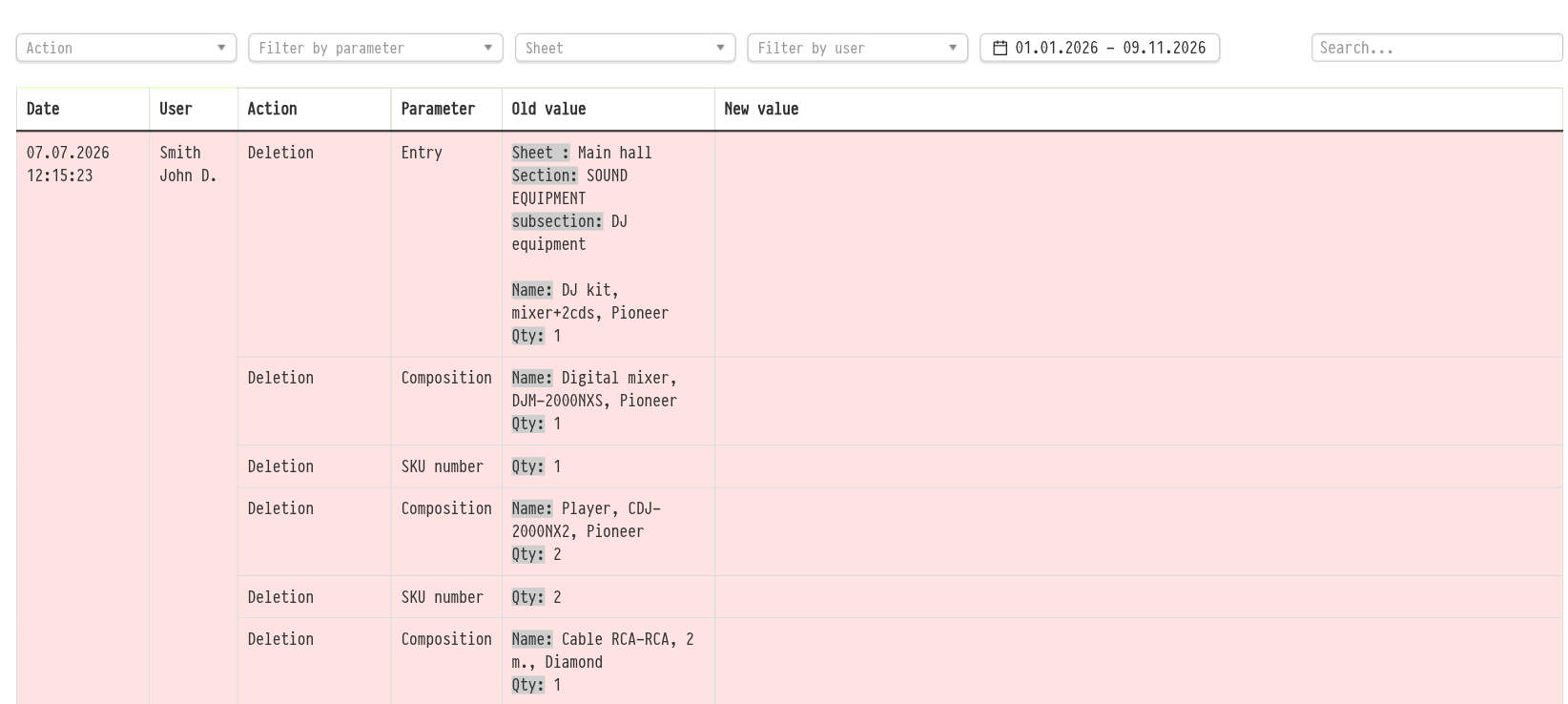
Each record has the columns "Date", "User", "Action", "Parameter", "Old value" and "New value". The changed part of a value is highlighted in grey. Rows are coloured by action type: green for creating, turquoise for change, red for deletion, lilac for data access (for example, opening the project or printing).
Filters
Above the table of each block there are filters:
"Action": creating, change, deletion and the other actions of this block;
"Filter by parameter": which parameter was changed;
"Filter by user": who made the changes;
period: you can choose the dates manually or take a ready-made one: "Current month", "Last month", "Three months", "Half-year", "Year";
"Search...": search by the text of the records.
Please note. By default, records from the beginning of the current year are shown. If the project was created earlier, extend the period, otherwise older records will not get into the table.
You can combine the filters.
Specification log
The "Specification" block records all specification changes at three levels:
entry: what was added, deleted, what quantity was set;
composition: changes in the composition of an entry;
SKU: which units of equipment were assigned to the project, replaced or removed.
The log includes manual edits, bulk actions and updates of the sheet composition. In the "Action" filter, besides creating, change and deletion, there are separate items "Updating the composition", "Changing the booking time" and "Random assignment of SKUs". In the parameter filter you can choose "Entry", "Composition", "SKU number", "Sheet", "Status" and "Estimate". A separate "Sheet" filter leaves only the records of one specification sheet.
If one user action affected several levels at once (for example, an entry was deleted together with its composition and assigned SKUs), it is all shown as one record: the date and user are given once, and the affected rows follow below. Records are separated by a bold line. This keeps the log readable even after bulk operations.
History of a specific SKU in a project
To follow the path of one unit of equipment, enter the SKU number in the "Search..." field of the "Specification" block. Only the records with this SKU remain: when it was assigned to the project, when it was changed, when it was removed and who did it.
Please note. The "History" tab shows the changes of one project. The same records for all projects at once are collected in "Databases" → "System log", which is opened by a separate right in the access template, on the "System" tab, in the "System logs" block. See System log.