Integration
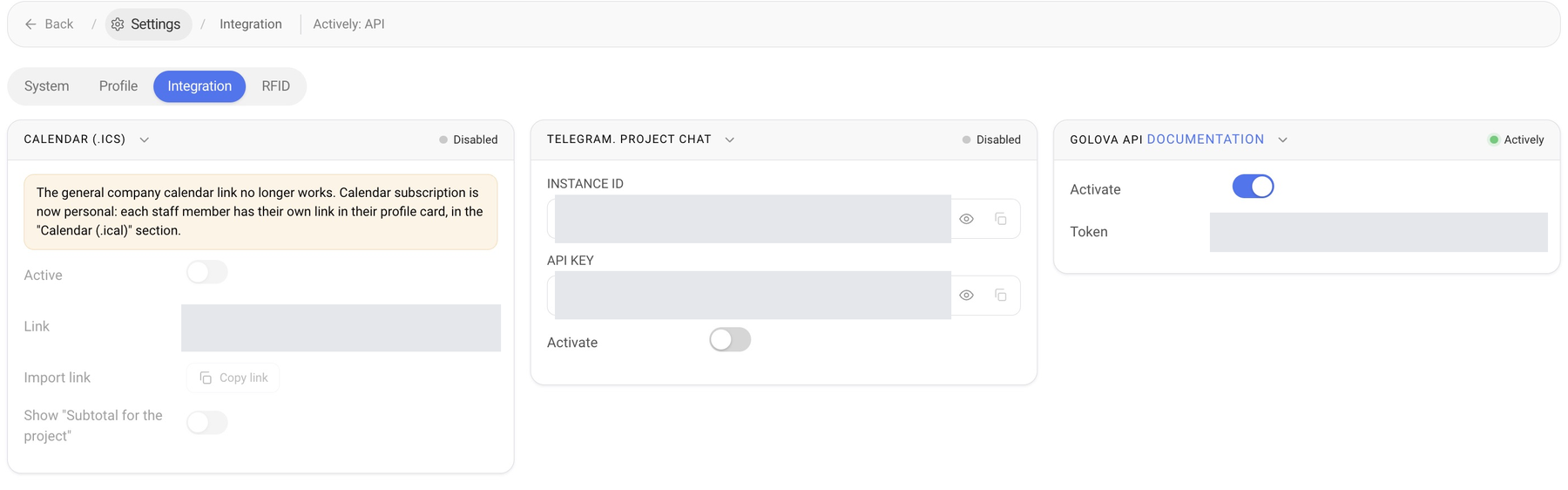
The “Integration” tab of the settings connects your Golova account with other services. Open it with the gear icon: “Settings” → “Integration”. The navigation line shows which integrations are on, for example “Actively: API”.
Calendar (.ics)
The general company calendar link no longer works, and the block is marked “Disabled”. Its fields (“Active”, “Link”, “Import link” with “Copy link”, Show “Subtotal for the project”) are inactive. Calendar subscription is now personal: each employee has their own link in their profile card, in the “Calendar (.ical)” section. How to add it to Apple or Google Calendar is described in External Calendar (.ical).
Telegram. Project chat
This block connects a project chat in Telegram. Enter the “INSTANCE ID” and “API KEY” from your provider and turn on “Activate”. The indicator on the right of the block shows whether the integration is on.
Golova API
The API lets you exchange Golova data with other systems: your website, accounting software, BI reports. To enable access, turn on “Activate”. Access works with a token: the key that an external system sends with every request.
Please note. The token gives access to your company data, so keep it like a password. If it has leaked, click “Reissue token” in the “Token” row: the old token stops working, and you need to enter the new one in all connected systems.
The “Documentation” link in the block title opens the description of all API methods with request and response examples. The documentation was updated in version 20.4.