Warehouse statuses
Warehouse statuses describe the path of a project’s equipment: picked, sent to the venue, received back. The current warehouse status is shown in the project header next to the estimate and specification statuses, and it changes in the new warehouse interface (the “Warehouse” menu) as the equipment is picked, issued and received. The “Location” property tells the system where the equipment is now.
The list is set up in “Settings” → “System” → “Statuses”, block “Warehouse statuses”. In the demo account the default chain is: “in progress” (warehouse), “ready” (warehouse), “sent out” (venue), “received” (warehouse).
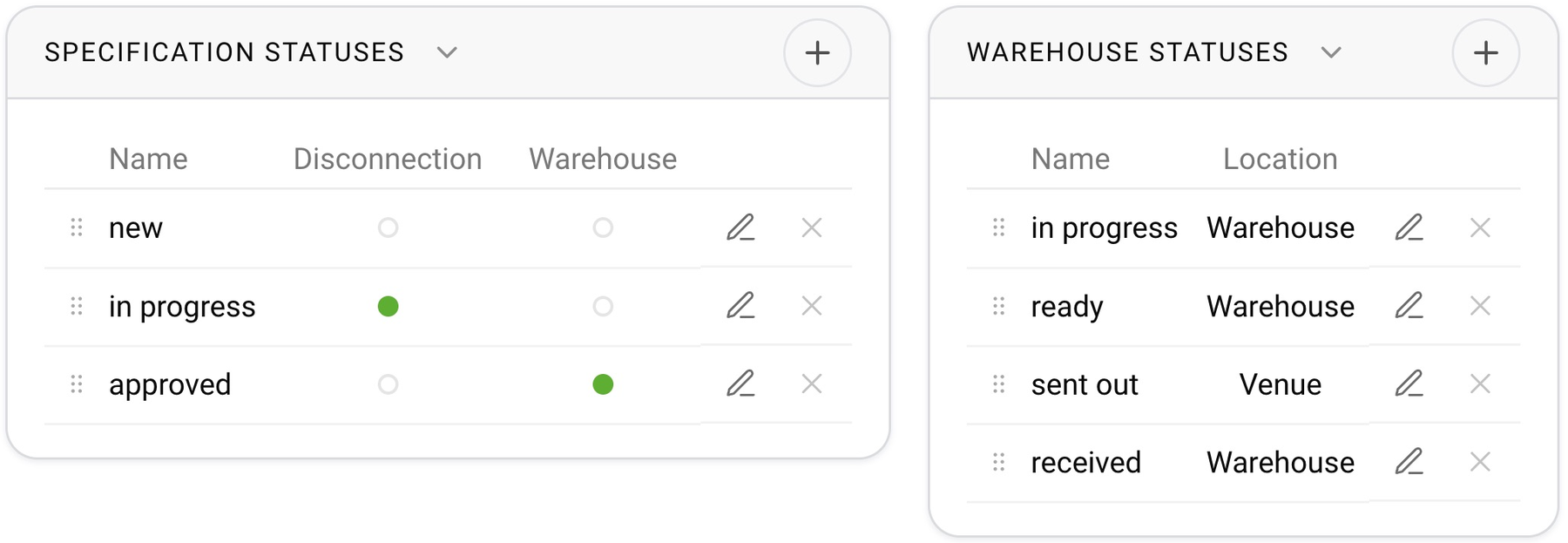
The “Location” property
Each status has one of two values: “Warehouse” or “Venue”. The move between them determines the movement of the equipment:
a move to a status with the location “Venue” means the equipment has been issued, and the system considers it to be at the venue;
a move back to a “Warehouse” status after the venue means the equipment has been received into the warehouse;
the system uses the location to detect overdue returns, and mass receiving works from it.
Please note. While some of the project’s equipment remains at the venue, the project cannot be moved to an estimate status with the “Return of equipment” flag. So the last warehouse status in the chain must have the location “Warehouse”: it is the one that closes the return.

How to add or change a status
Click “+” in the block header, enter a name and choose the location. The order is changed by dragging: the chain goes from top to bottom. A status used by project items cannot be deleted.
The colors of warehouse statuses and the other rows in the calendar are set on the “Calendar” tab.