Global settings
Global settings open from the gear icon «Settings» in the top right corner; on a phone, from the «Settings» item in the right menu. Changes here apply to all employees of the company.
The section is available to employees whose access template allows the «System» line in the «Settings» block of the «System» tab. Others will see a message that the section is only available to those with access to system settings.
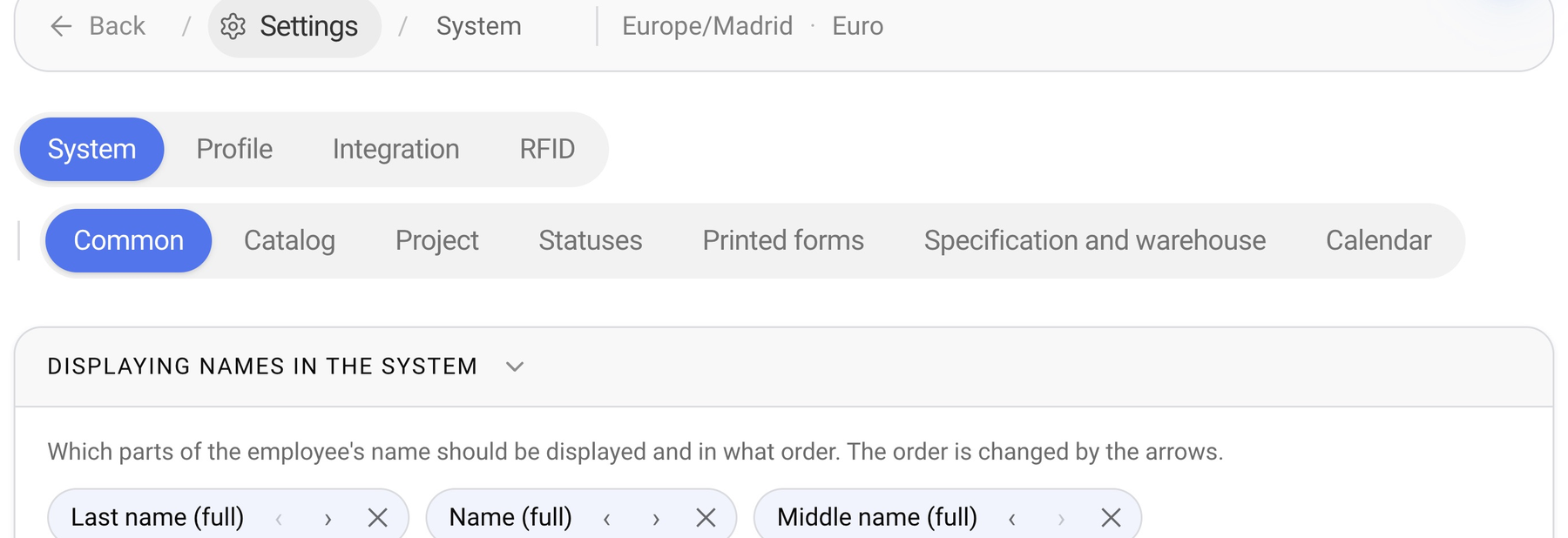
How the screen is organised
System — the main settings of the company. Sub-tabs: «Common», «Catalog», «Project», «Statuses», «Printed forms», «Specification and warehouse», «Calendar».
Profile — company name, description, contacts and address.
Integration — Telegram, Golova API and the calendar link. See «Integration».
RFID — receivers and warehouse stations. See «RFID».
Above the tabs there is a navigation line: «Back», «Settings», the current section and a short summary, for example the time zone and currency for «System», active integrations for «Integration», the number of receivers for «RFID».
Please note. There is no «Save» button on this screen. Every change is saved automatically: «Saving…» and then «Saved» appear on the right.
Each tab and sub-tab has its own address, so you can bookmark a settings page or send a link to a colleague.
Articles in this section
System — time zone, currency, name display, «What's new» feed.
Catalog — catalog sorting, SKU prefix and postfix.
Statuses — estimate, specification, warehouse, document and finance statuses.
Printed forms — the quotation and document builder.