Subscription and payment
Working in Golova is paid for with a subscription to a service plan. The plan defines how many users, guests and projects per month you have and which features of the system are available.
Before version 19.6, all of this was only in the personal account, and emails about the end of the subscription went to the address the account was created with. Often this is a mailbox nobody checks, and the team learned that the subscription had ended only when they saw a blocked login screen. Now the expiry date is visible right in the system, to everyone you give access to.
Subscription badge
In the system header, to the left of the log out button, there is a badge with the name of your plan.
While there are more than 30 days left until the end of the subscription, the badge shows the plan name and the date: "Paid until …". It looks calm: white, like the other header buttons.

When 30 days or fewer are left, the badge shows the number of remaining days instead of the date. Closer to the end, the badge changes color:
7 days or fewer left: light red;
3 days or fewer left: bright red;
on the last day: "Expires today";
the subscription has ended: the badge says it has expired.
It is hard to miss, and that is the point.
The badge works in both the old and the new interface.
Subscription window
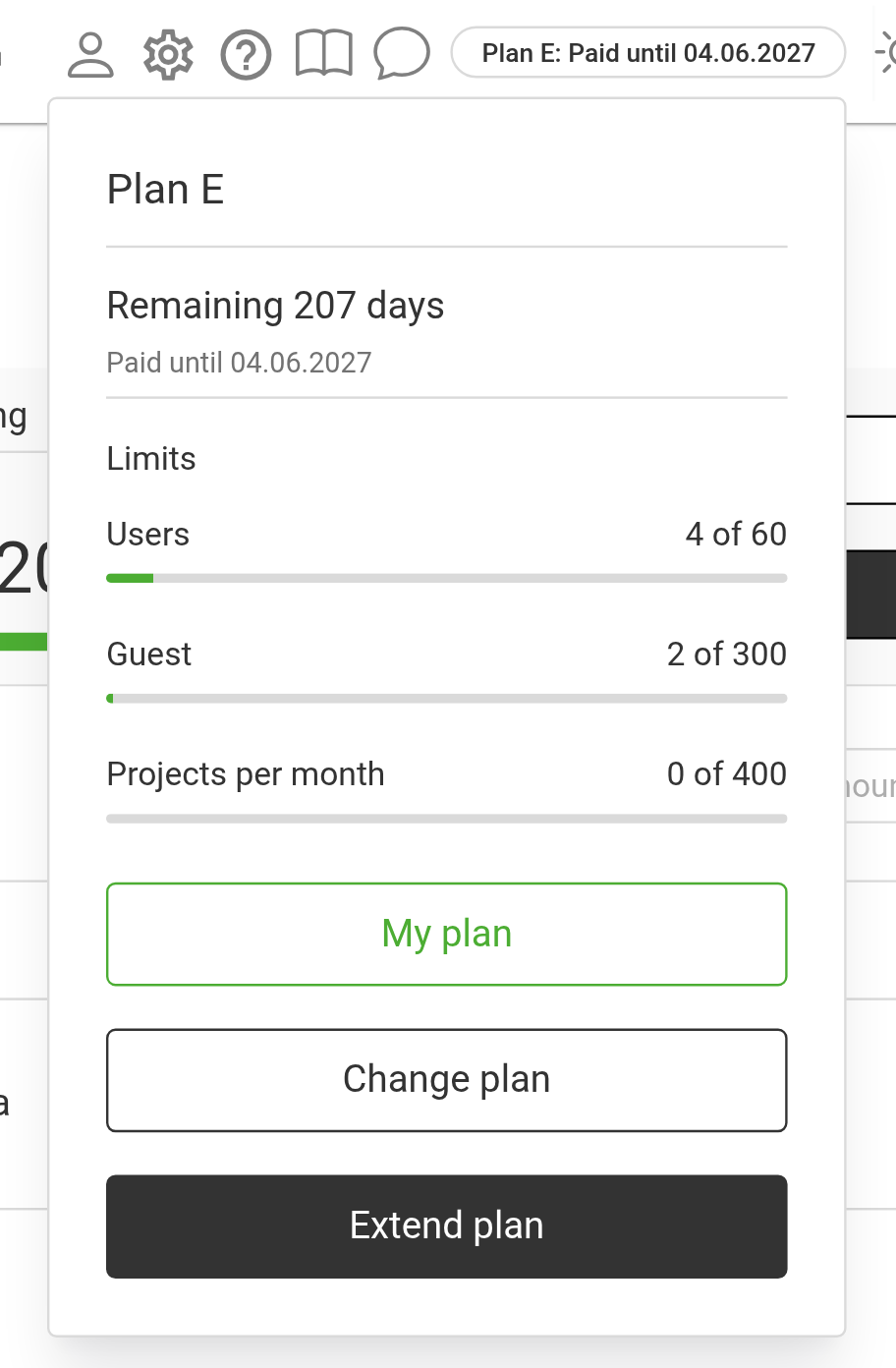
Hover over the badge or click it to open the subscription window. It shows:
the plan name;
how many days are left and the "Paid until" date;
the "Limits" block: how much is used out of what is available: "Users", "Guest" (if guests are included in the plan) and "Projects per month", each with a progress bar.
At the bottom of the window there are buttons:
"My plan": opens the My plan page in a new tab;
"Change plan": opens the page that compares plans;
"Extend plan": opens the renewal window.
Which of the "Change plan" and "Extend plan" buttons you see depends on your rights: see below. How to renew or change the plan: Renewing and changing the plan.
If the subscription has ended
When the subscription has expired, clicking the badge opens the "Access to the system is blocked" window. It has the "Pay for a subscription" and "Choose a new pricing plan" buttons, and "Write to support". Your data is not deleted for three months while access is restricted.
Who sees it
Please note. The badge is hidden by default. An administrator gives access: this is done on purpose, so that not everyone sees the subscription data and can pay.
Open "Databases" → "Employees" → "Options" → "Access templates", edit the template you need and find the "Subscription button" parameter on the "System" tab (see Creating a new template).
There are four values:
Value | What the user can do |
|---|---|
"hide" | No badge, the subscription pages are not available |
"read-only" | Sees the badge, the subscription window and the "My plan" page. Cannot pay, renew or change the plan |
"renewal only" | Can pay for and renew the subscription, but cannot change the plan |
"full access" | Viewing, payment, renewal and changing the plan |
A typical setup: "full access" for the company head and whoever is in charge of payments; "renewal only" for the accountant; "read-only" for managers and the warehouse. This way, people see in advance that the subscription is ending and have time to warn the person in charge, instead of finding a blocked login one morning.