Update prices
The "Update prices" item in the estimate sheet menu pulls the current prices from the catalog into the sheet. You need it if catalog prices changed while you were working on the project, if the project was created by copying an older one, or if the price type of the project was changed.
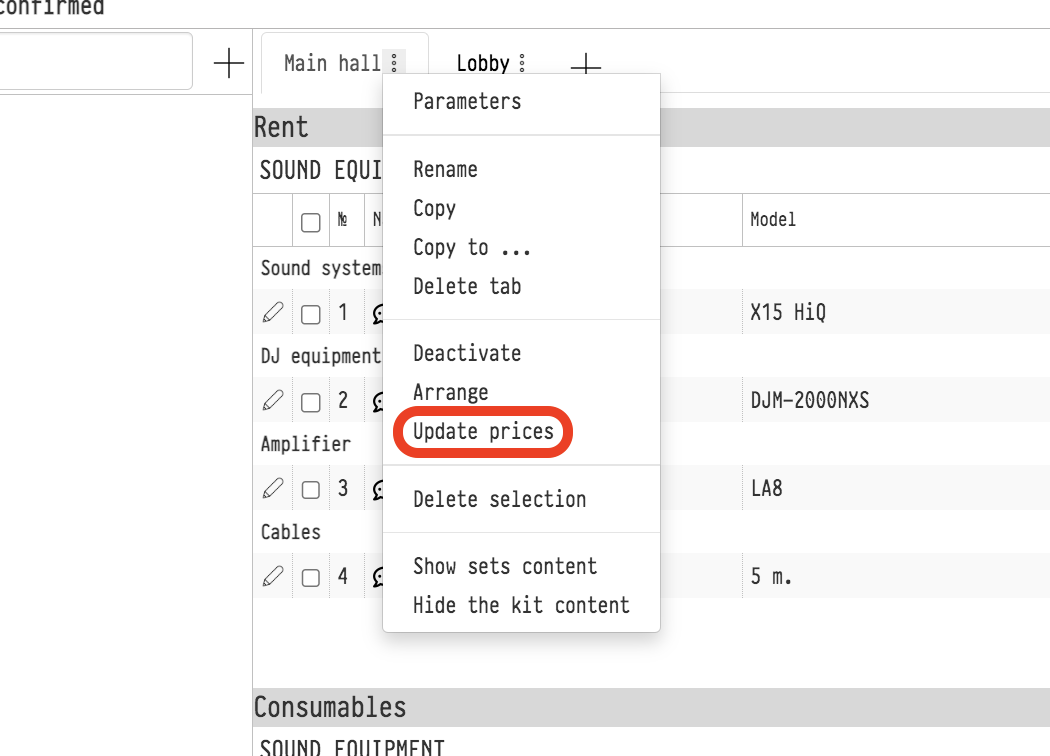
How to run it
Open the estimate sheet you need, click the three dots next to its name and select "Update prices". The action runs at once, without a confirmation window, and applies only to this sheet. Other sheets of the estimate are updated separately.
The item is visible if your access template gives full access to the estimate "Parameters" and the current estimate status allows editing (the "Editing the Quotation" flag, see Estimate statuses).
What changes
For each entry added from the catalog, the price is replaced with the current catalog price.
If a price type is selected in the project (the "Price type" field on the "Information" tab), the price of this type is used. More: Price types.
The price of a kit and a set is recalculated from their contents, the same way as in the catalog.
If the client or internal comment of an estimate row is empty and the catalog entry card has a comment, it is filled into the row. Comments that are already filled in do not change.
The totals of the sheet and of the whole estimate are recalculated.
What does not change
Coefficients and discounts, both of the rows and of the sheet.
Quantities of the entries.
Entries created directly in the estimate, without the catalog (the "plus" symbol to the right of the "Search" field): they have no catalog price.
Please note. Prices you corrected manually in the rows of this sheet are replaced with catalog prices. If you need to keep a price, move the entry to another sheet or correct the price again after the update.
Please note. If a price type is selected in the project and the entry has no price of this type in the catalog, the price of the entry in the estimate becomes zero after the update. Check such rows or fill in the prices of this type in the catalog.
Each price change is recorded in the project history: you can see which entry, on which sheet, the old and the new price.