My plan
The "My plan" page has everything about your subscription: what your current plan includes, when it ends, what you paid for and when, and which documents you can download.
To open the page, hover over the subscription badge in the system header and click "My plan" in the window that appears. The page opens in a new tab.
Page header
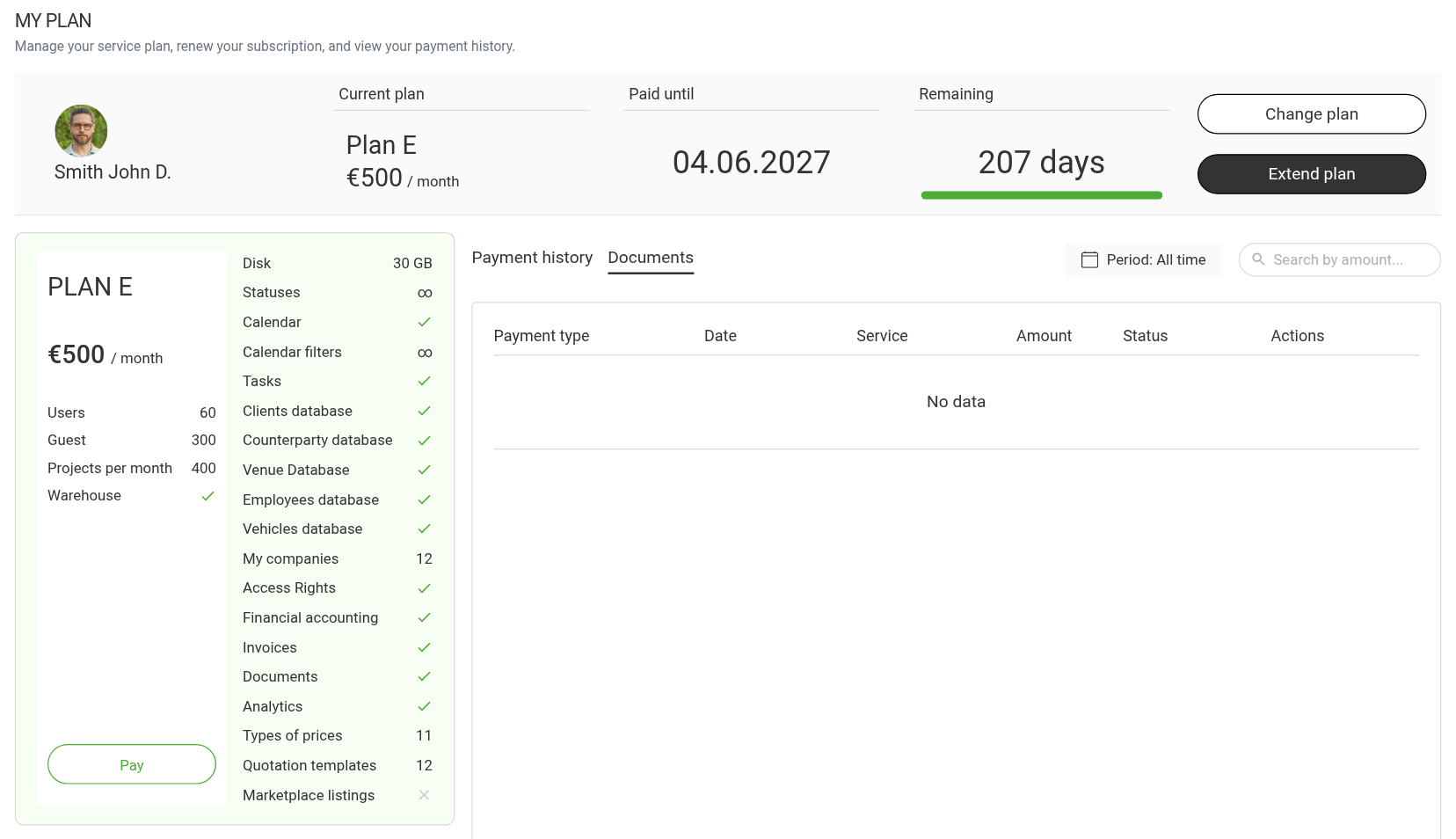
On the left there are your name and avatar, and next to them three indicators:
"Current plan": the name and the price per month;
"Paid until": the date the subscription ends;
"Remaining": the number of days, with a progress bar.
On the right there are the "Change plan" and "Extend plan" buttons. Not everyone sees them: "Change plan" only with full access to the subscription, "Extend plan" with full access and with "renewal only" access. The rights are set in the access template, the "Subscription button" parameter: see Subscription and payment.
Plan contents
On the left there is the card of your plan. At the top are the main limits: users, guests, projects per month, warehouse. Below is the full list of what is included: disk space, number of statuses, the calendar and its filters, tasks, databases (clients, counterparties, venues, employees, vehicles), my companies, access rights, financial accounting, invoices, documents, analytics, price types and quotation templates.
How to read the values:
Sign | Meaning |
|---|---|
Check mark | The feature is on |
Number | A limit: how much is available |
∞ | No limit |
Cross | Not available in this plan |
"soon" | The feature will appear in one of the next versions |
Under the plan contents there is the "Pay" button: it opens the same window as "Extend plan".
Please note. Not all features are included in all plans. For example, warehouse accounting is available starting from plan C. If your plan does not have the row you need, you get it by moving to a higher plan: see Renewing and changing the plan.
Payment history
The "Payment history" tab has all past payments: payment type, date, service (which plan and for how long you paid) and amount.
At the top there is a filter by period ("Period") and a search by amount. It is an ordinary working table: for example, you can pull up all payments for the last year to check them with your accountant.
Documents
The "Documents" tab has the same payments, with two extra columns: "Status" and "Actions". For a card payment, the "Actions" column has "Download receipt".