Copying in the catalog
In the catalog you can make a copy of a section, a subsection or an entry. This is handy when you need a similar entry, for example the same fixture with different contents, or when you create a new section based on an existing one. The copy gets all the settings of the original, and you only need to correct the differences.
How to copy
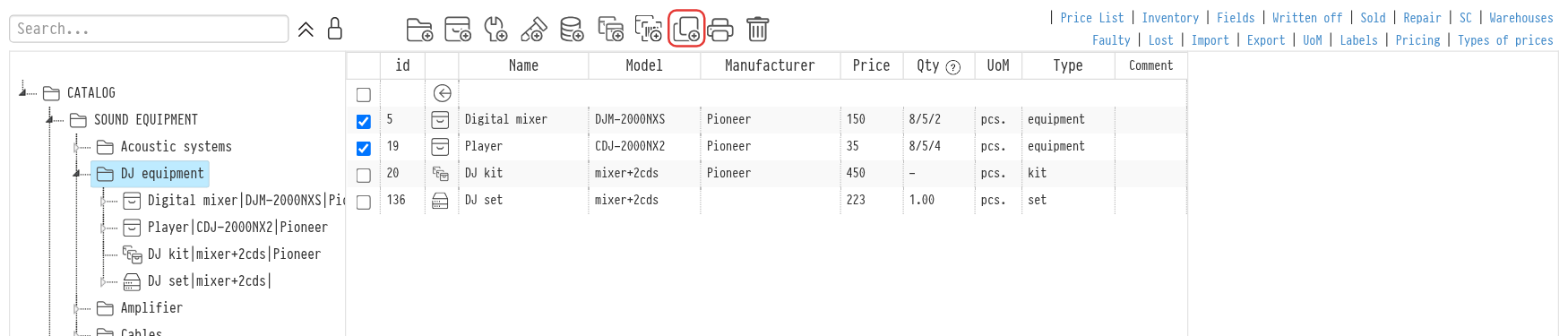
Open the catalog section that contains what you want to copy. For example, to copy the "SOUND EQUIPMENT" section, open the level above it, where this section is shown as a row in the work area.
Tick the rows you want to copy. You can tick several sections and entries at once.
Icons for actions with the selected rows appear in the top menu of the work area. Click the copy icon.
Confirm the copying.
The copy appears in the same section as the original, at the end of the list. You can then rename it, edit it or move it to another section.
Please note. The icons for actions with selected rows are visible to employees whose access template has "full access" selected for the "Information" row on the "Catalog" tab.
What is copied
A section or subsection is copied with all its contents: nested subsections and entries. " - copy" is added to the name of a copied section so you can easily tell it apart.
An entry is copied with the same name and all its parameters: prices, including prices by price type, fields, description, links, files and photos. For a kit, its contents are copied too.
The copy has its own files and photos: if you delete a photo from the copy, the original keeps it.
Please note. SKUs are not copied. The copied entry has no stock: add the SKUs again. How to do it: Equipment SKU.
Copying is recorded in the "System log" as the creation of a new element, with a note of which element it was copied from.
Key concepts
copying, section copy, entry copy, catalog, duplicate entry, kit, SKUs