Written off
The "Written off" list contains SKUs that have been taken out of use: they are no longer counted in the total quantity of the entry and cannot be booked. The list opens with the "Written off" link above the catalog table.
How an SKU gets into the list
From the "Faulty" list. The "write off" icon in the SKU row, see Faulty.
From the repair list. If the device could not be repaired, click the "Write off" icon in its row. In the "Write-off" window, in the "Completion of repairs" part, enter the work done and the actual repair cost, and in the "Write-off" part, the date and a comment with the reason. See Under repair.
From the SKU card in the catalog. Click "edit" next to the "Qty" field and choose the "write off" action (see Equipment SKU).
From the catalog working area. Select the SKUs with checkboxes and click the trash can icon above the working area (see Sections and subsections of the catalog).
With the trash can you can write off several SKUs at once. If the SKUs have already been used in projects or have been in the catalog for a long time, the system says that they cannot be deleted, only written off. The window offers a choice: write off, or write off and delete. Deleting is meant for newly created SKUs, for example ones added by mistake.
The date and comment you entered at write-off are kept in the list: you can always see when and why the device was taken out of use.
What the list shows
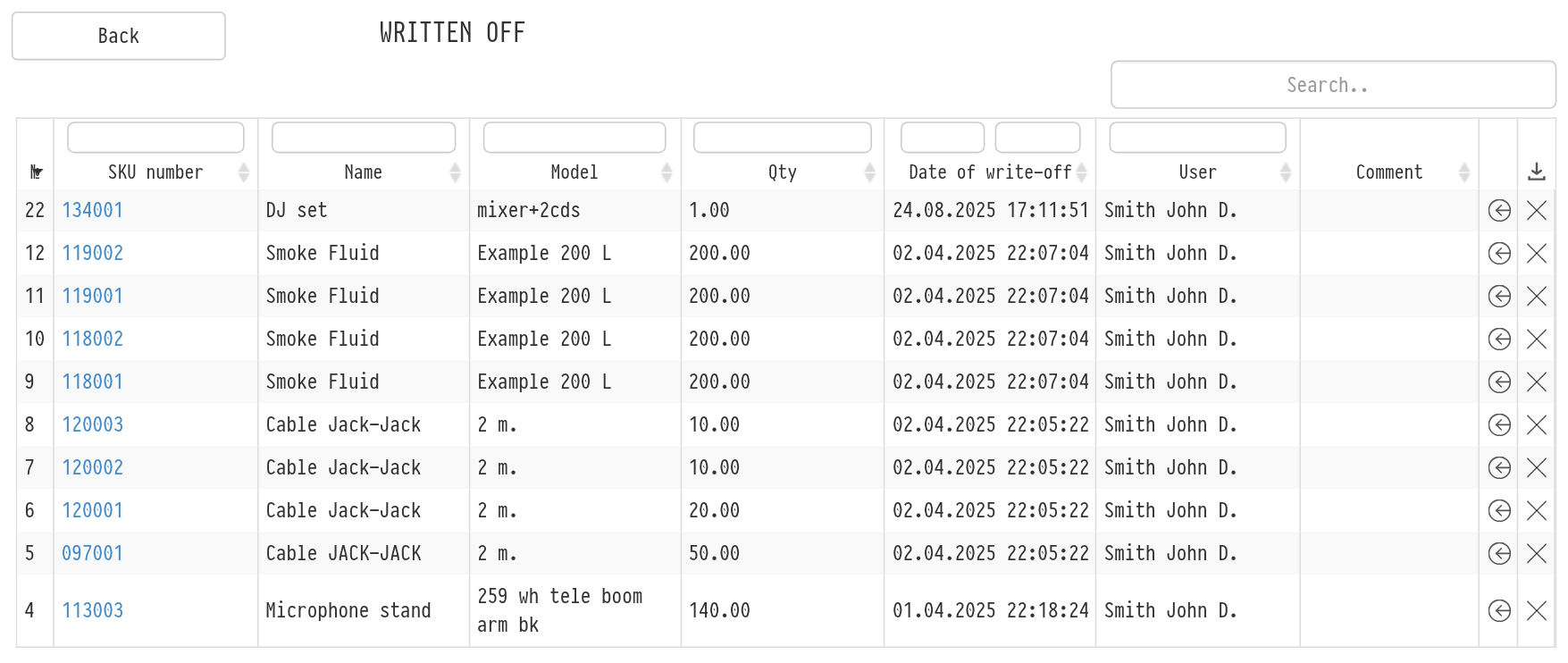
The table shows the "SKU number" (click it to open the SKU log), "Name", "Model", "Qty", "Date of write-off", "User" (who wrote it off) and "Comment". Above the columns there are filters.
Actions in the list
"return to warehouse": if the SKU was written off by mistake. In the "Return to the warehouse" window, write a comment on the return and click "Return". The SKU appears in the catalog again and is available for booking.
"delete": delete the SKU permanently. This releases the SKU number, but the SKU history and log are deleted together with it.
Please note. Deleting cannot be undone. If you may need the history of the device, for example for the repair report, keep the SKU in the "Written off" list.